


Under Invoice Process
New Delhi
06 Mar 2025
Domestic
One Way
Mumbai
08 Mar 2025
Audit/Sustainability/Risk Management
DIN10002025001570
View Details

How We Simplified Employee Travel Management with AI for GMR Corporate users
Worked on simplifying the Travel Request (TR) journey and designing an AI-assisted Travel Expense (TE) filing experience through UX research, user flows, wireframes, high-fidelity designs, and cross-functional collaboration.

Shayan Alam
UI UX Designer
PRODUCT CONTEXT

Hoi - Corporate Travel
Hoi partnered with GMR to transform their employee travel operations from a paper-based workflow into a digital-first experience. We designed a Corporate Travel module that enabled employees to manage Travel Requests and Expense Claims seamlessly, while leveraging AI to automate expense filing and reduce manual effort.
Project Overview
Outline
This project highlights how we uncovered usability challenges in corporate travel management and redesigned the Travel Request (TR) journey while incorporating AI powered Travel Expense (TE) filing. The solution simplifies complex workflows, automates expense reporting, and improves the overall employee experience.
Project
Corporate Travel
Category
B2B Travel Solutions
Location
New Delhi
Year
2026
Problem
Corporate travelers currently face a complex, time-consuming Travel Request (TR) creation process, with multiple categories, fields, and decisions presented at once. This increases cognitive load, slows task completion, and raises the likelihood of errors or incomplete submissions. Returning users enter the same travel information, creating unnecessary effort and frustration.
Corporate employees currently spend 30+ minutes filing Travel Expenses (TE) because the process is manual, fragmented, and error-prone. Users repeatedly enter expense details, attach receipts, and verify policy compliance, which causes submission delays, inaccurate data, and frequent policy violations. This increases administrative effort for employees and approvers, reduces productivity, and creates frustration throughout the expense reporting journey.
Gathering Insights
Designing the mobile version of a Corporate Travel system (including TR – Travel Request and TE – Travel Expense) means prioritizing essential features, simplified UI, and fast access, since users are likely on the move. Here’s a focused approach i took while designing for the same:
Observation
The TR creation process is complex, requiring multiple clicks and lacking clear navigation. Similarly, the TE filing process is complicated, with manual expense entry making it time-consuming and inefficient.
True Problem
The form-filling process is complex and time-consuming, making it difficult for users to complete and verify their profiles efficiently. This creates problem in Raising of TR and Settling TE.
Scope of the feature
Redesign the Corporate Travel experience by simplifying the Travel Request (TR) creation journey with a guided, intuitive flow while leveraging AI to automate Travel Expense (TE) filing. The solution aims to reduce manual effort, eliminate repetitive tasks, improve accuracy and policy compliance, and enable employees to complete travel requests and expense submissions faster with a seamless end-to-end experience.
Desired Outcome
Create a faster, smarter, and more intuitive corporate travel experience by simplifying Travel Request creation and automating Travel Expense filing with AI. The solution aims to reduce manual effort, shorten completion time, improve accuracy and policy compliance, and deliver a seamless end-to-end experience for employees and approvers.
Digging Deeper: Problem Identification Methods


Scope Refinement
We took into account enhancement opportunities, quick turn around and minimal effort to shape the direction for moving forward.

The Solution - (For Problem Statement 1)
Our proposed solution simplifies the Travel Request (TR) creation experience by breaking the process into clear, category-wise steps, reducing cognitive load and making it easier for users to complete requests accurately.

Homepage of the Corporate Travel
On the Hoi Homepage User switches to corporate travel view where we have kept the functionality simple in the first fold itself.
1. User can raise their Travel Request
2. User can settle their Travel Expense against TR.
3. Travel Request and Travel Expense can be approved
4. Tracking is easier for all TR & TE.
The Saved drafts can be viewed simply from here
Your upcoming Trips Card saved at one place
Create a TR - (Select Trip Category)
User now views a bottom sheet which says them to select their preferred Trip Category in order to proceed.
They can select their trip for a Self/Employee or a Guest and the type of trip i.e Domestic/International.


TR for Myself - International
On selecting Self/International category user gets redirected to the summary page of TR where they need to first fill up their basic details.
WHY IT MATTERS
Categorizing the sections helps us organize the extensive form fields more effectively. Once users complete all the required sections, they can submit all the information in a single step. Also if they wish to quit in between they can save their information by clicking on Save as draft
These fields are non activated since Basic details are not filled
Trip Category can be updated by clicking on the edit icon
Filling Up my Basic Details
User now views a bottom sheet which says them to select their preferred Trip Category in order to proceed.
They can select their trip for a Self/Employee or a Guest and the type of trip i.e Domestic/International.


Basic Details Added
After the basic detail is added we have taken users Primary destination, now user can fill up his
1. Transportation details
2. Hotel/Forex
3. Visa/Insurance
4. Passport
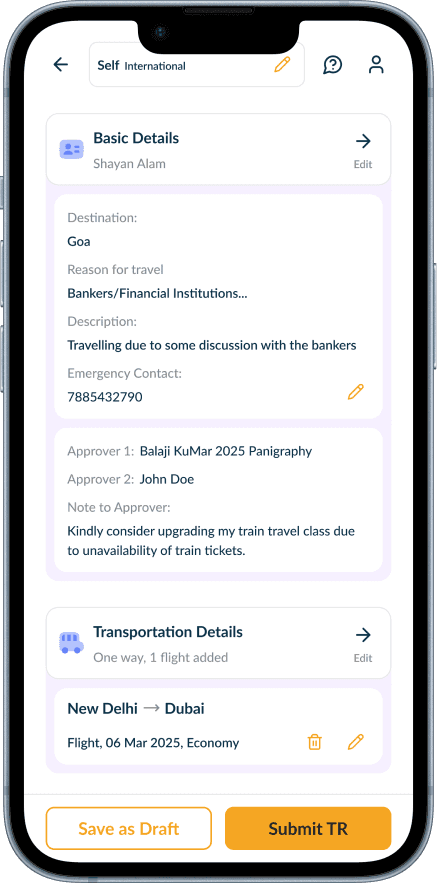
Now after filling the Transportation Details the Submit TR CTA will be enabled and user can submit his TR or Save the filled information by clicking on Save as draft .
This Segment Opens up your Flight, Train or Bus Section where user submits his desired means of transport
This opens up your Hotel and Forex Option Where user enters the Hotel (City, Check In & Check Out Date)


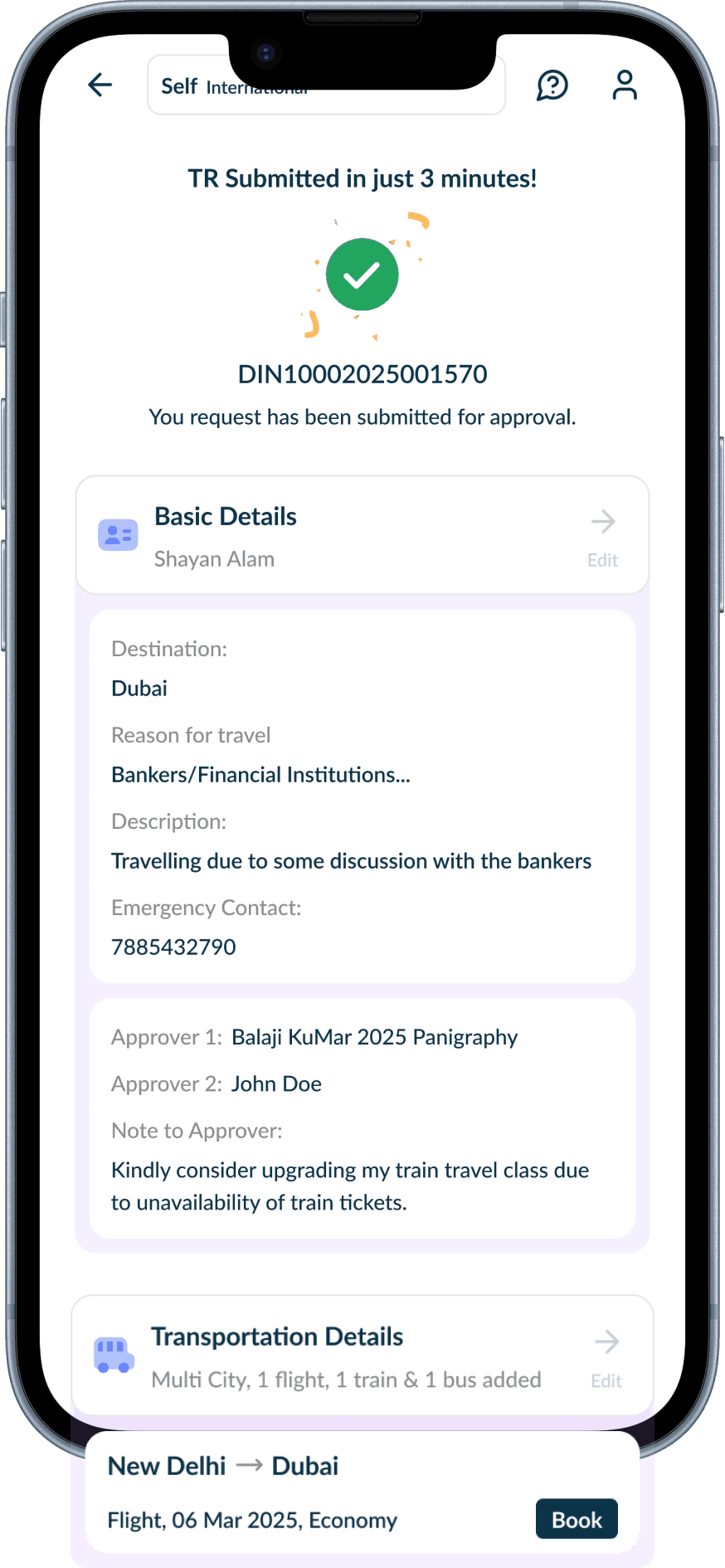
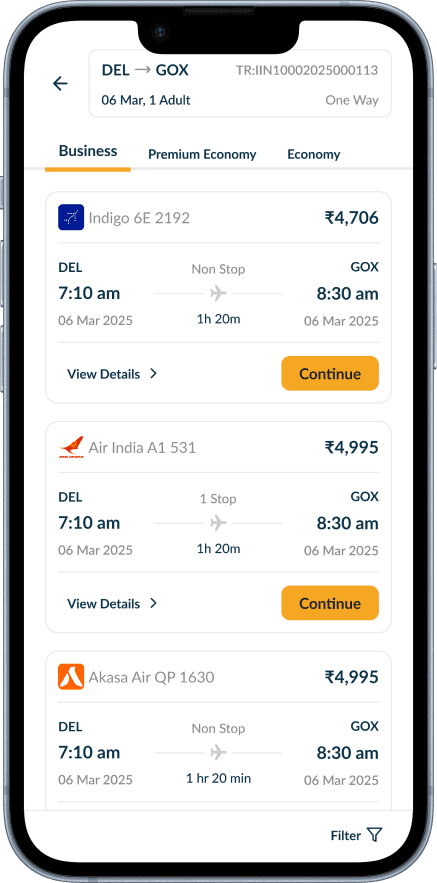
DIN NO. Generated

TR is now submitted and DIN No. is generated based on that. User can now book his flight.
The Status of TR No. will be shown in the Trips Section of Homepage


The Solution - (For Problem Statement 2)
Our proposed solution uses AI to auto fill expense details from receipts and guides users through a simplified TE filing flow. Built-in policy validation reduces errors, cuts filing time, and improves accuracy.

Old Flow
In the old flow, corporate employees spent 30+ minutes filing Travel Expenses (TE) due to a manual, fragmented, and error-prone process. Entering every expense detail was time-consuming and frustrating.
The user had to fill each lengthy form i.e Ticket Expense, Accommodation, Per Diem, Conveyance, Miscellaneous, Forex Advance and come back to the summary page

Adding Expense against the TR
TE ( Travel Expense Summary Page)
Ticket Expense Form Field

AI + Travel Expense
To address our users' biggest pain point, we introduced Joey—Hoi AI's intelligent expense filing assistant. Joey automatically extracts data from receipts, invoices, and PDFs to pre-fill Travel Expense (TE) forms in real time, eliminating manual data entry. Powered by AI and informed by competitor research, it reduces filing time from 30+ minutes to under 10 minutes while improving accuracy and minimizing policy violations.
Brainstorming
To simplify the experience, we broke the AI Expense Filing flow into five easy-to-follow sections, making the process more structured, intuitive, and user-friendly.

New Flow
In the new flow, we are demonstrating the Travel Expense Filing through our AI Agent Joey. This will save our time as Joey intelligently extracts expense data and auto-fills the filing form section by section

User clicks on the Add Expense CTA and it opens the summary page of Travel Expense
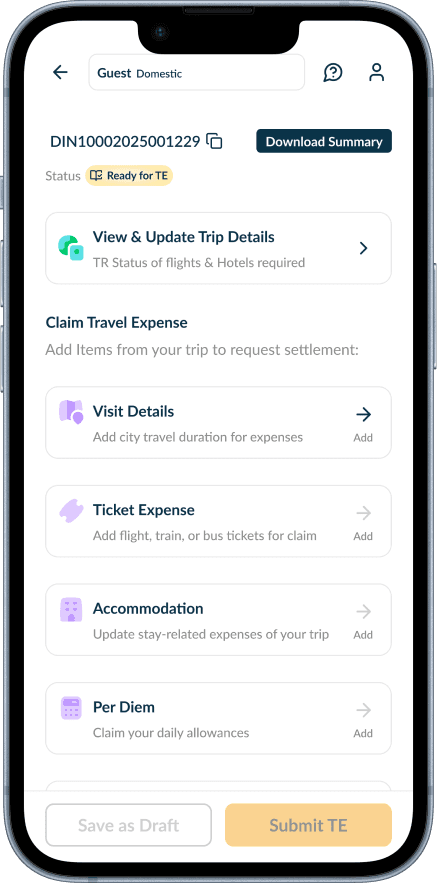
This Travel Expense Summary Page asks you to fill up your Visit Details

Corporate User Fills up his visit details and clicks on Start Filing Expense
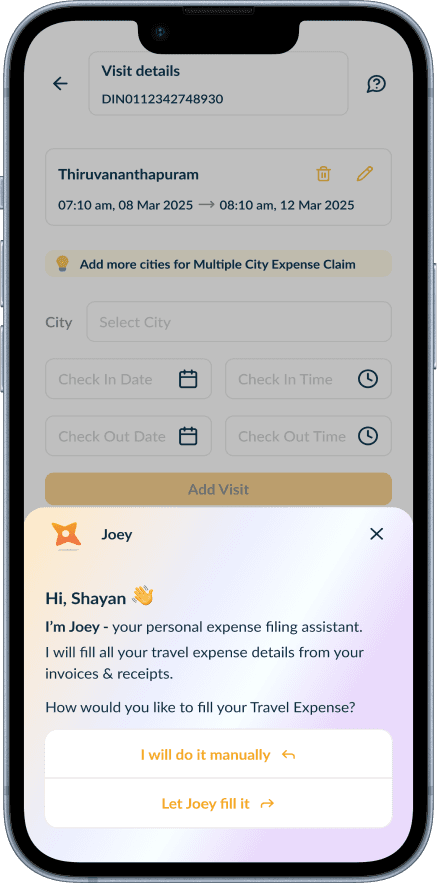
This initiates the automatic filing flow where Joey files your expenses by parsing the information from receipts.

User Uploads their Invoices here

All the files are uploaded and now user can click on continue filing CTA

Since user has uploaded all the information your following details gets automatically filled up such as :
Ticket Expense
Accommodation
Per Diem
Conveyance
Miscellaneous
Cash Advance

Expense Submitted with AI in 10 Mins
User clicks on the Add Expense CTA and it opens the summary page of Travel Expense
This Travel Expense Summary Page asks you to fill up your Visit Details
Corporate User Fills up his visit details and clicks on Start Filing Expense

Key Impact
Reduced the overall number of support tickets by simplifying the travel request and expense filing experience.

10.76%
Reduction in overall support tickets
Currently based in Delhi. Always happy to connect